Online Platforms for ICT Content Development
A particularly built online platform that makes use of Internet technology. Online platforms have transformed information access. Today, we use the Internet to perform such things as well as for educational purposes.
Debate
Two groups will be formed in the class. one
"TEAM SOCIAL MEDIA" is represented by one group, while "TEAM BLOGGERS" is represented by the other. A ten-minute closed group discussion on the advantages of each platform will take place. After 5 minutes, the groups will select five members to debate which platform is better and why.
What is Cloud Computing?
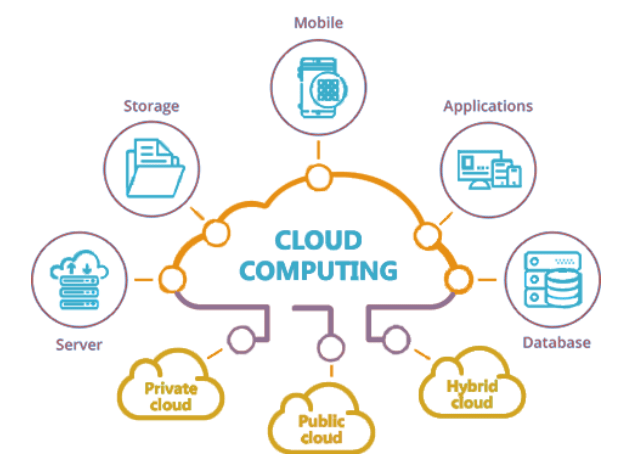
Instead of using a local server or a personal computer, a network of distant servers housed on the Internet is used to store, manage, and process data.
These are internet-based applications that don't require any installation. It can be accessed with only an internet connection. Cloud computing is defined as "the delivery of hosted services over the internet." It has both advantages and disadvantages, and it is up to us to decide what we want and how we want to utilize it.
Advantages
- There's no need to install anything.
- Hard disk drive is saved.
- Access to your software/files is simple, and it can be used from anywhere with an internet connection.
- Save money by not purchasing extra software licenses or hard disk space.
- There is no need to update because it updates itself.
- System basic standards
- Data recovery and backup are much easier than on a physical device.
Disadvantages
- Slow Internet speeds, no connectivity, and no cloud computing can all slow you down.
- Compatible software, such as a browser, may still be required.
- You are renting the program rather than owning it.
- When compared to using your personal computer alone, performing anything through the Internet poses a security risk.
- Hacking is more likely.
- Control over the infrastructure is limited.
Online Technologies
These are electronic tools, systems, devices, and resources that generate, store, or process data so that end users can access information via the Internet. Presentation programs, forms, and file management are examples of online technologies.
Prezi

An online presentation tool that employs motion, zoom, and spatial relationships to bring your ideas to life and improve your presentation skills. You must either create an account or download the software to your computer. Your completed presentation will subsequently be made available on the internet.
Emaze

Prezi works in a similar way. You may easily construct a presentation using one of their free presentation templates. It comes with an HTML 5 presentation creator that lets you make slide displays, video presentations, and 3D presentations.
Mindmeister

It's an online mind mapping application that lets users graphically create, develop, and exchange ideas. It's a mind map editor that may be used for brainstorming, taking notes, planning projects, and other creative tasks. It is a web-based application that does not require downloading or updating.
Sibelius

An online music composition platform. It's a piece of music composing software. You can create your own video score and publish it on social media.
Google Drive
It is a Google-developed file storage and syncing service. Users can store data on their servers, sync files across devices, and share files. Google Drive is a secure storage location where you can back up and access all of your information from any device.
Dropbox
Dropbox is a file hosting service run by Dropbox, Inc., an American company that provides cloud storage, file synchronization, personal cloud, and client software. Dropbox allows you to access your files for free from a variety of devices, including computers, phones, and tablets.
Microsoft OneDrive
It is Windows 10 and Office 365's default online storage and synchronization service. It backs up, protects, syncs, and makes your files accessible across all of your devices.
Platforms for Content Development
Various platforms for digital content creation - from blog sites to social media - have had their day in the spotlight with the development of Web 3.0, but they all have their merits and cons depending on your needs. Let's examine which technologies will work best for your future content publishing requirements. We'll concentrate on platforms that enable us to distribute our own material to the rest of the globe.
Differentiate Social Media Platform from Blogging Platform
- Social Media Platforms. Facebook, for example, allows users to create not only personal profiles, but also pages and groups where you may share material. The only drawback is that you're stuck with Facebook's "one-size-fits-all" design. Facebook, on the other hand, has billions of users. LinkedIn is another example of a social networking site that focuses on professional and business networking.
- Blogging Platforms. Content and design are the focus of websites like WordPress, Tumblr, and Blogger. It usually resembles a newsletter, with possibilities to customize the style to your preference. The design can be changed by users. The level of customization available in blogs is determined by the content management system used by the provider.
Content Management System
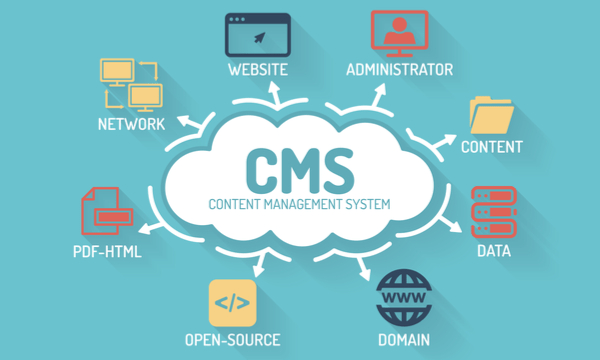
- A Material Management System (CMS) is a computer application that allows you to publish, edit, manage, organize, and delete web content. It can be online or browser-based.
- Blogs, news websites, and commerce websites all use CMS. You can use the following Web Site Builders to create your own website, whether you're starting a shopping site or a blog:
Wix.com

An Israeli software firm that specializes in cloud-based web development. A free program that allows you to create and personalize a website for your business or community. Wix.com allows you to create your own high-quality websites.
Squarespace
A private American firm situated in New York City that provides website construction and hosting software as a service. Squarespace is a one-stop shop for anyone wishing to build a stunning website using an award-winning template.
WordPress

A content management system that is free and open-source. WordPress.com makes it simple to create a free website or a blog. There are dozens of free, mobile-friendly designs and themes to choose from.
People often believe that WordPress cannot be used for business or professional purposes. We often assume that WordPress is only used for blogging, however it also powers http://www.sonymobile.com and https://mercedes-benz.com/en. For serious websites, WordPress is regarded as a serious platform. Your talents and imagination are the only boundaries to what you can create for yourself, from personal blogs to ecommerce sites.
Because of its customizability and plug-ins, this content publishing platform appeals to site creators. WordPress.com (completely hosted by WordPress) and WordPress.org are the two platforms(a freely downloadable self-hosted version).
The great growling engine of change technology
Alvin Toffler
 Zamina